Linux File Systems: A Comprehensive Guide from Philosophy to Practice
Table of Contents
Introduction: The “Everything Is a File” Philosophy
“Everything is a file” is one of the core design principles of Linux. This abstraction applies not only to regular text and binary files but also to directories, hardware devices, pipes, and sockets. In Linux, a hard disk partition, a mouse, a terminal, and even inter‑process communication channels are all represented as files.
This uniform abstraction allows the operating system to use the same set of system calls – open(), read(), write(), close() – to interact with all resources. It simplifies both kernel development and application programming. The implementation of this consistent interface rests on the flexible and layered architecture of the Linux file system.
1. What Is a File System?
A file system is the mediator between the storage device and user processes. It defines the rules for naming, organising, and accessing data. Its primary purposes are:
- Data storage and organisation – structuring storage into files and directories for easy use by processes.
- Naming and locating – providing human‑readable names and using inodes to locate data on disk.
- Persistence – ensuring data survives power cycles and system reboots.
- Access control – enforcing permissions (read, write, execute) for users and groups.
- Performance and efficiency – employing caching, prefetching, and layout optimisations.
- Consistency and recovery – using journaling or copy‑on‑write mechanisms to maintain data integrity after crashes.
2. Three Design Principles of Linux File Systems
Linux inherits and extends the Unix file system model. Three principles stand out:
- Everything is a file – all resources are exposed through the file interface.
- Single hierarchical directory tree – unlike Windows with multiple roots (C:, D:), Linux uses a single root
/. All storage devices are mounted into this tree at specific directories (mount points). - Mounting – mounting associates a file system (e.g., Ext4 on a partition, FAT32 on a USB stick) with an empty directory. After mounting, accessing that directory gives access to the device’s contents.
3. The Virtual File System (VFS) Layer
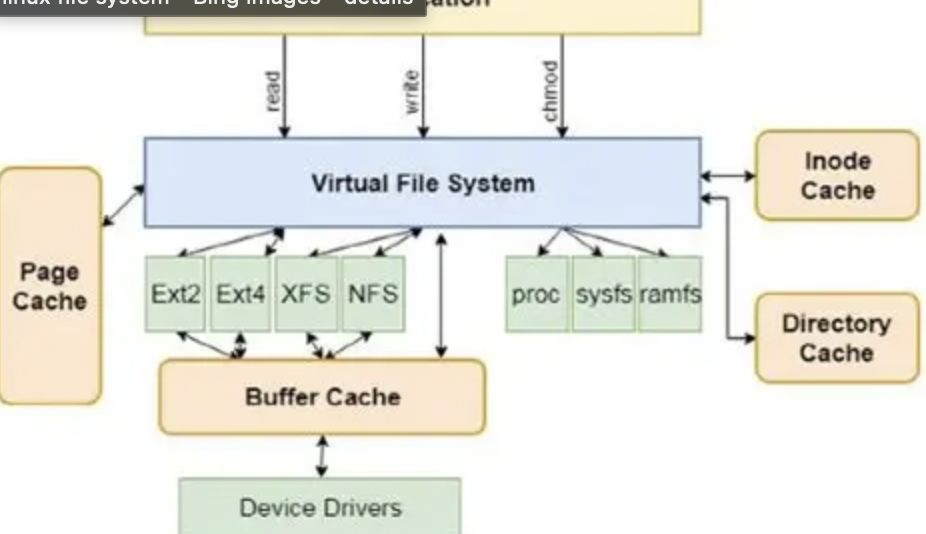
Linux supports dozens of file system types (Ext4, XFS, Btrfs, FAT, NTFS, etc.). This is made possible by the Virtual File System (VFS), an abstraction layer between user‑space system calls and the concrete file system implementations.
VFS provides:
- A uniform API (open, read, write, stat, etc.) for user applications, independent of the underlying file system.
- A mechanism to dispatch each operation to the appropriate file system driver.
- Caching structures (dentry cache, inode cache, page cache) to speed up path resolution and I/O.
VFS defines a set of objects that every file system must implement: superblock, inode, dentry, and file. These objects are used by the kernel to manage all mounted file systems and route requests correctly.
4. Core Concepts: inode, dentry, and block
To work with Linux file systems, you must understand three fundamental data structures:
-
inode (index node) – Each file and directory has a unique inode number. The inode stores metadata about the file: size, permissions (rwx), owner (UID and GID), timestamps (access, modify, status change), and pointers to the data blocks on disk. The inode does not store the file name; that mapping is handled by the directory.
-
dentry (directory entry) – A kernel‑side structure that represents a directory entry. It links a file name to its inode. Dentries are cached in the dentry cache to accelerate path‑name lookups (e.g., resolving
/home/user/file.txtinto its components). -
block – The smallest unit of disk space allocation in a file system, typically 4 KB. The actual content of a file resides in one or more data blocks.
The lookup flow is: file name → dentry (cache) → inode → block pointers → disk data.
5. On‑Disk Structure of a File System
Every file system instance on a disk partition has a standard layout:
- Superblock – contains metadata about the entire file system: total size, number of inodes, number of free blocks, file system type, and state.
- Inode table – a contiguous area holding all inodes. Each inode has a fixed size.
- Data blocks – the actual storage area for file contents, directories, and extended attributes.
Additionally, many file systems include a journal or log area for crash recovery (Ext4, XFS) or use copy‑on‑write (Btrfs) to ensure consistency.
6. Comparison of Mainstream File Systems
The three most common Linux file systems are Ext4, XFS, and Btrfs. Their key characteristics are summarised below:
| Feature | Ext4 | XFS | Btrfs |
|---|---|---|---|
| Max file size | 16 TiB | 8 EiB | 16 EiB |
| Max volume size | 1 EiB | 8 EiB | 16 EiB |
| Strengths | Stability, backward compatibility, general‑purpose | High scalability, excellent throughput for large files and parallel I/O | Snapshots, compression, checksums, copy‑on‑write, RAID support |
| Typical use cases | Desktops, laptops, small‑to‑medium servers | Big data, database servers, high‑performance computing | Cloud environments, virtualisation, advanced data management |
Selection guidelines:
- General desktop or laptop – choose Ext4 for its proven reliability. It is the default for most distributions.
- Heavy server workloads – choose XFS if you need high throughput and large file support.
- Advanced features – choose Btrfs if you require built‑in snapshots, compression, or data integrity checking (checksums). Note that Btrfs is mature but may still have edge‑case issues; evaluate accordingly.
- SSD / flash storage – consider F2FS (Flash‑Friendly File System), which is optimised for NAND flash characteristics.
For beginners, Ext4 is the safest and most thoroughly tested option.
7. Filesystem Hierarchy Standard (FHS)
The Linux Foundation maintains the FHS, which defines the purpose and structure of each top‑level directory. This standard ensures consistency across distributions.
Key directories and their functions:
| Directory | Purpose |
|---|---|
/ |
The root of the entire directory tree. |
/boot |
Boot loader files, kernel image, and initial RAM disk. |
/home |
User home directories; each user has a subdirectory here. |
/etc |
System‑wide configuration files (text‑based). |
/var |
Variable data – logs, spool files, temporary cache, and state files. |
/tmp |
Temporary files, usually cleared on reboot. |
/dev |
Device files – special files representing hardware (e.g., /dev/sda for the first SCSI disk). |
/proc |
A pseudo‑file system that exposes kernel and process information (e.g., /proc/cpuinfo, /proc/<pid>/). |
/sys |
Another pseudo‑file system for kernel objects and device drivers (sysfs). |
/mnt or /media |
Traditional mount points for temporary or removable media. |
8. Essential File System Management Commands
Below are the most frequently used commands for inspecting and managing file systems:
| Command | Purpose | Example |
|---|---|---|
df -h |
Display disk space usage of mounted file systems in human‑readable format. | df -h |
df -T |
Show the file system type for each mounted partition. | df -T |
du -sh |
Show total disk usage of a specific directory. | du -sh /home |
fdisk / gdisk |
Partition table manipulation (MBR or GPT). | sudo fdisk /dev/sda |
mkfs.ext4 |
Create an Ext4 file system on a partition. | sudo mkfs.ext4 /dev/sda1 |
mkfs.xfs |
Create an XFS file system. | sudo mkfs.xfs /dev/sda1 |
mount |
Mount a file system to a mount point. | sudo mount /dev/sda1 /mnt |
umount |
Unmount a mounted file system. | sudo umount /mnt |
tune2fs |
Adjust Ext2/Ext3/Ext4 file system parameters (e.g., reserved blocks). | sudo tune2fs -l /dev/sda1 |
xfs_info |
Display XFS file system information. | sudo xfs_info /dev/sda1 |
btrfs |
Subcommand suite for managing Btrfs (subvolumes, snapshots, etc.). | sudo btrfs subvolume list / |
9. Summary
The Linux file system stack is a robust and well‑engineered component that upholds the “everything is a file” abstraction while supporting a wide variety of storage technologies. From the VFS layer that dispatches system calls, to the on‑disk structures (superblock, inode table, data blocks), every level is designed for clarity, performance, and extensibility.
Understanding these concepts is essential for system administrators, developers, and power users. It enables better decisions about partitioning, file system selection, performance tuning, and failure recovery. Whether you are managing a personal workstation or a large‑scale server farm, a solid grasp of file system internals will pay dividends in reliability and efficiency.
No comments yet. Share your thoughts below.